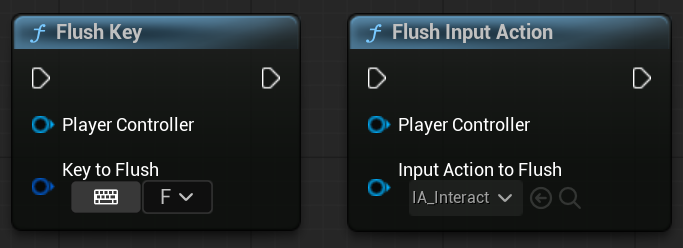
Flush refers to clearing or resetting input states.
It is used when you want to discard previously pressed keys or buttons so they don’t affect the game anymore.
You typically flush keys when:
- Pausing or unpausing the game
- Entering a cutscene
- Switching menus or UI screens
- Changing input contexts (gameplay ↔ UI)
Why do we need to flush inputs?: To prevent stuck inputs or unintended actions caused by old key presses.
Flushing All Keys
If you are using Unreal Engine 5.5 or newer version, you can flush all keys with the UEnhancedInputLibrary::FlushPlayerInput static function in both C++ and Blueprint.

but if you’re using an older version, you need to write a wrapper function since APlayerController::FlushPressedKeys function is not marked as BlueprintCallable.
You can write this function in your custom Player Controller class, or create a static function in any class. I choose second option.
public:
	UFUNCTION(BlueprintCallable)
	static void FlushAllPressedKeys(APlayerController* PlayerController);
void UMyBlueprintFunctionLibrary::FlushAllPressedKeys(APlayerController* PlayerController)
{
	if (PlayerController && PlayerController->PlayerInput)
	{
		PlayerController->FlushPressedKeys();
	}
}
Flushing Single Key
But if you don’t want to flush all input, just a single key or input action, that is a little bit complicated.
First, you need to create a new class that derives from UEnhancedPlayerInput.(I will call it MyPlayerInput)
UCLASS()
class YOURPROJECT_API UMyPlayerInput : public UEnhancedPlayerInput
{
	GENERATED_BODY()
};
Then you need to assign this class as Default Player Input Class under the Project Settings > Input.

By FKey
To flush a single key, first we need to get this key’s state and check if it’s pressed. If it’s pressed, all we need to do is just write a code that simulates released event for the key.
To do that, I created a function in UMyPlayerInput and called it FlushKey.
// UMyPlayerInput.h
public:
	void FlushKey(const FKey& Key);
// UMyPlayerInput.cpp
void UMyPlayerInput::FlushKey(const FKey& Key)
{
	if (!Key.IsValid()) return;

	if (auto KeyState = GetKeyStateMap().Find(Key))
	{
		if (KeyState->bDown)
		{
			// Inject a simulated Released event for this key
			FInputKeyEventArgs Params = FInputKeyEventArgs::CreateSimulated(Key, IE_Released, 0.0f, 1);
			InputKey(Params);

			UWorld* World = GetWorld();
			check(World);
			float TimeSeconds = World->GetRealTimeSeconds();
			KeyState->RawValue = FVector::ZeroVector;
			KeyState->bDown = false;
			KeyState->bDownPrevious = false;
			KeyState->LastUpDownTransitionTime = TimeSeconds;
			KeyState->bWasJustFlushed = true;
		}
	}
}
By Input Action
As a quick refresher, In Unreal’s Enhanced Input System, we define the keys through Input Action and Input Mapping Context. When we configure a
Input Mapping Context, the system stores all mapping info(FKey, Input Action, Triggers and Modifiers) under a struct: FEnhancedActionKeyMapping
If we gather all keys mapped to a given Input Action, we can flush them individually using FlushKey.
To do that, I created a function called FlushInputAction
// UMyPlayerInput.h
public:
	void FlushInputAction(UInputAction* InputAction);
inside the function, we can iterate active enhanced action mappings by calling protected GetEnhancedActionMappings function.
// UMyPlayerInput.cpp
void UMyPlayerInput::FlushInputAction(UInputAction* InputAction)
{
	TArray<FKey, TInlineAllocator<32>> AssignedKeys;
	for (const FEnhancedActionKeyMapping& Mapping : GetEnhancedActionMappings())
	{
		if (Mapping.Action == InputAction)
		{
			AssignedKeys.AddUnique(Mapping.Key);
		}
	}

	for (const FKey& AssignedKey : AssignedKeys)
	{
		FlushKey(AssignedKey);
	}
}
If a mapping references the specified InputAction, its associated key is collected.
AddUnique ensures that the same key is not processed multiple times, even if it appears in multiple contexts.
Finally, each collected key is flushed via FlushKey, ensuring all active key states related to the Input Action are cleared.
Overriding Input Key function
// UMyPlayerInput.h
public:
	virtual bool InputKey(const FInputKeyEventArgs& Args) override;
Why Override InputKey Function?
FlushKey injects a simulated Released event.
However, the real hardware Released event will still arrive when the player physically releases the key.
Without overriding InputKey, the engine would process both events, causing duplicate Released notifications.
Overriden Function
// UMyPlayerInput.cpp
bool UMyPlayerInput::InputKey(const FInputKeyEventArgs& Args)
{
	if (auto KeyState = GetKeyStateMap().Find(Args.Key))
	{
		// Swallow the next real Released event after a flush
		if (Args.Event == IE_Released && KeyState->bWasJustFlushed && !Args.IsSimulatedInput())
		{
			KeyState->bWasJustFlushed = false;
			return true;
		}

		// Reset the flag when the key is pressed again or repeats
		if ((Args.Event == IE_Pressed && !Args.IsSimulatedInput()) || Args.Event == IE_Repeat)
		{
			KeyState->bWasJustFlushed = false;
		}
	}
	return Super::InputKey(Args);
}
Inside InputKey, we:
- Detect a real (non-simulated) Released event that arrives after a key was flushed.
- Consume (swallow) that event so it does not propagate to input bindings or gameplay logic.
- Allow simulated Released events (generated by FlushKey) to pass through normally.
- Clear the “just flushed” state when:
- The key is physically pressed again, or
- A key repeat event occurs.
This guarantees that:
- Each key produces only one logical Released event,
- Input state stays consistent,
- Stuck inputs are safely resolved without side effects.
Exposing Functions To Blueprints
Since PlayerInput is not directly accessible from Blueprints, we expose wrapper functions.
// Blueprint Function Library Header file
public:
	UFUNCTION(BlueprintCallable)
	static void FlushAllPressedKeys(APlayerController* PlayerController);

	UFUNCTION(BlueprintCallable)
	static void FlushKey(APlayerController* PlayerController, FKey KeyToFlush);

	UFUNCTION(BlueprintCallable)
	static void FlushInputAction(APlayerController* PlayerController, UInputAction* InputActionToFlush);
// Blueprint Function Library Source file
void UMyBlueprintFunctionLibrary::FlushAllPressedKeys(APlayerController* PlayerController)
{
	if (PlayerController && PlayerController->PlayerInput)
	{
		PlayerController->FlushPressedKeys();
	}
}

void UMyBlueprintFunctionLibrary::FlushKey(APlayerController* PlayerController, FKey KeyToFlush)
{
	if (!PlayerController || !PlayerController->PlayerInput || !KeyToFlush.IsValid()) return;

	if (auto MyPlayerInput = Cast<UMyPlayerInput>(PlayerController->PlayerInput))
	{
		MyPlayerInput->FlushKey(KeyToFlush);
	}
}

void UMyBlueprintFunctionLibrary::FlushInputAction(APlayerController* PlayerController,
	UInputAction* InputActionToFlush)
{
	if (!PlayerController || !PlayerController->PlayerInput || !InputActionToFlush) return;

	if (auto MyPlayerInput = Cast<UMyPlayerInput>(PlayerController->PlayerInput))
	{
		MyPlayerInput->FlushInputAction(InputActionToFlush);
	}
}